🔍 social-media-research-skill



Social Media & Public Opinion Analysis for AI Agents
Analyze what real people are saying on Reddit and X — powered by live data, not outdated training sets.
Analyze what real people are saying on Reddit and X — powered by live data, not outdated training sets.
🤔 What is it? • ✨ Features • ❓ Why? • 🚀 Quick Start • 📊 Analysis Types • 🔧 CLI Reference • 🛠️ Development • 🤝 Contributing
--- ## 🤔 What is it? **social-media-research-skill** is a social media & public opinion analysis skill for AI agents. It pulls **live discussions from real people** on **Reddit** and **X (Twitter)** and turns them into structured, evidence-backed insights — with real quotes, real sentiment, and up-to-date data. No hallucinated summaries. No stale training data. Just what people are **actually saying right now**. Works with **Claude Code**, **Cursor**, **Windsurf**, and other AI coding assistants. Use it for: - 🛒 **Product research** — real user opinions before you buy - 📈 **Market trends** — discover what's gaining traction early - 🏢 **Brand monitoring** — track public reaction to launches and events - ⚔️ **Competitive analysis** — understand real arguments on every side - 🔍 **Community research** — find what people are talking about right now - ✅ **Decision making** — crowd-sourced verdicts backed by real experiences --- ## ✨ Features ### ⚡ Quick Answer — Fast, direct answers Ask any question and get a straight answer pulled from real social media discussions. No deep analysis, just a quick summary of what people are saying. > _"Quick answer: Best $20 iems?"_ > **Based on recent Reddit and X discussions**, the most recommended IEMs under $20 are: > 1. **Moondrop Chu II** — praised for balanced tuning and build quality at the price > 2. **7Hz Salnotes Zero** — wide soundstage, often called "best value in audio" > 3. **CCA CRA+** — bass-heavy V-shape, popular with casual listeners > > _Sources: r/headphones, r/iems, X discussions from the past 7 days_ --- ### 🏆 Ranking — Community-driven rankings Find out what people actually recommend. Get ranked lists based on real community consensus, not SEO-optimized listicles. > _"What are the best open-back headphones for gaming in 2025?"_ 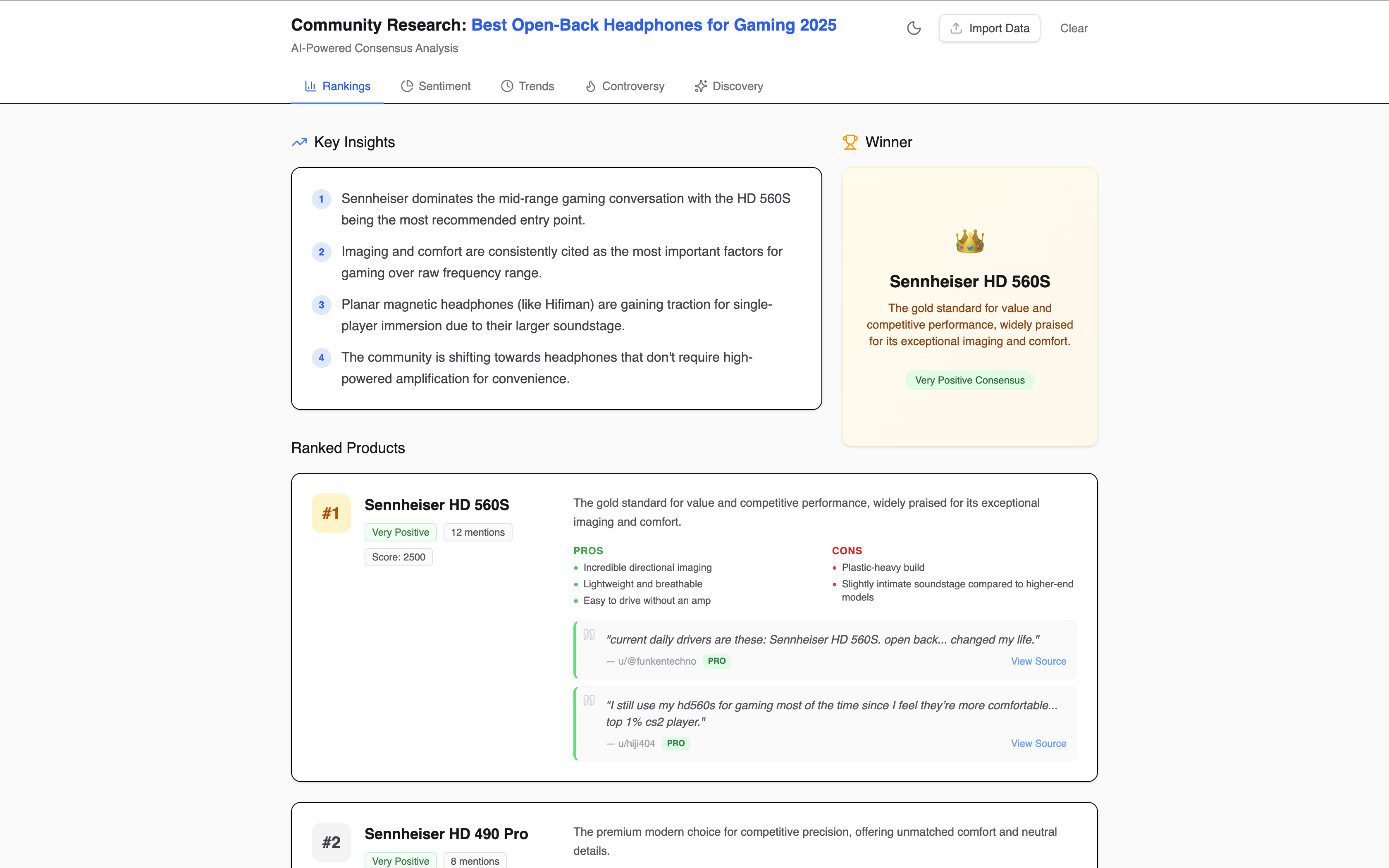 [👉 View Live Example](https://skainguyen1412.github.io/social-media-research-skill/visualize/index.html?mock=classified_rank) --- ### 💬 Sentiment — Public opinion at a glance Understand how people feel about any product, brand, or topic. See the breakdown — positive, negative, mixed — backed by direct quotes. > _"How do people feel about the Sony WH-1000XM6? Is the feedback positive?"_  [👉 View Live Example](https://skainguyen1412.github.io/social-media-research-skill/visualize/index.html?mock=classified_sentiment) --- ### 📈 Trends — Track how opinions shift over time See when something started trending, whether it's gaining or losing momentum, and how public opinion evolves. > _"When did the Sennheiser HD600 start trending again? Show me the timeline of its popularity."_ 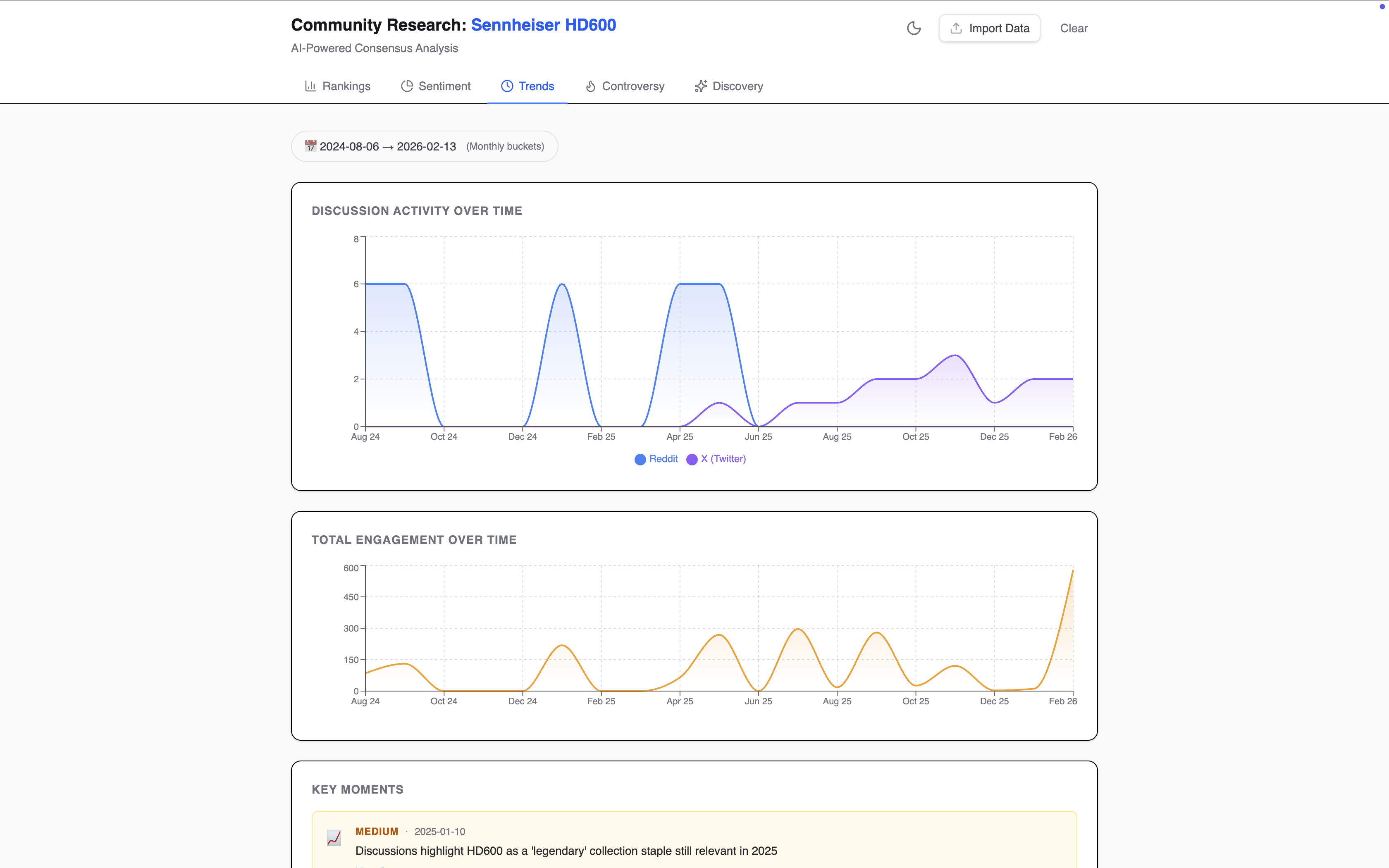 [👉 View Live Example](https://skainguyen1412.github.io/social-media-research-skill/visualize/index.html?mock=classified_trend) --- ### ⚔️ Controversy — Map both sides of any debate Understand polarizing topics by seeing every argument laid out with real evidence from both sides. > _"What is the debate about EQing audiophile headphones? Is there a lot of disagreement?"_ 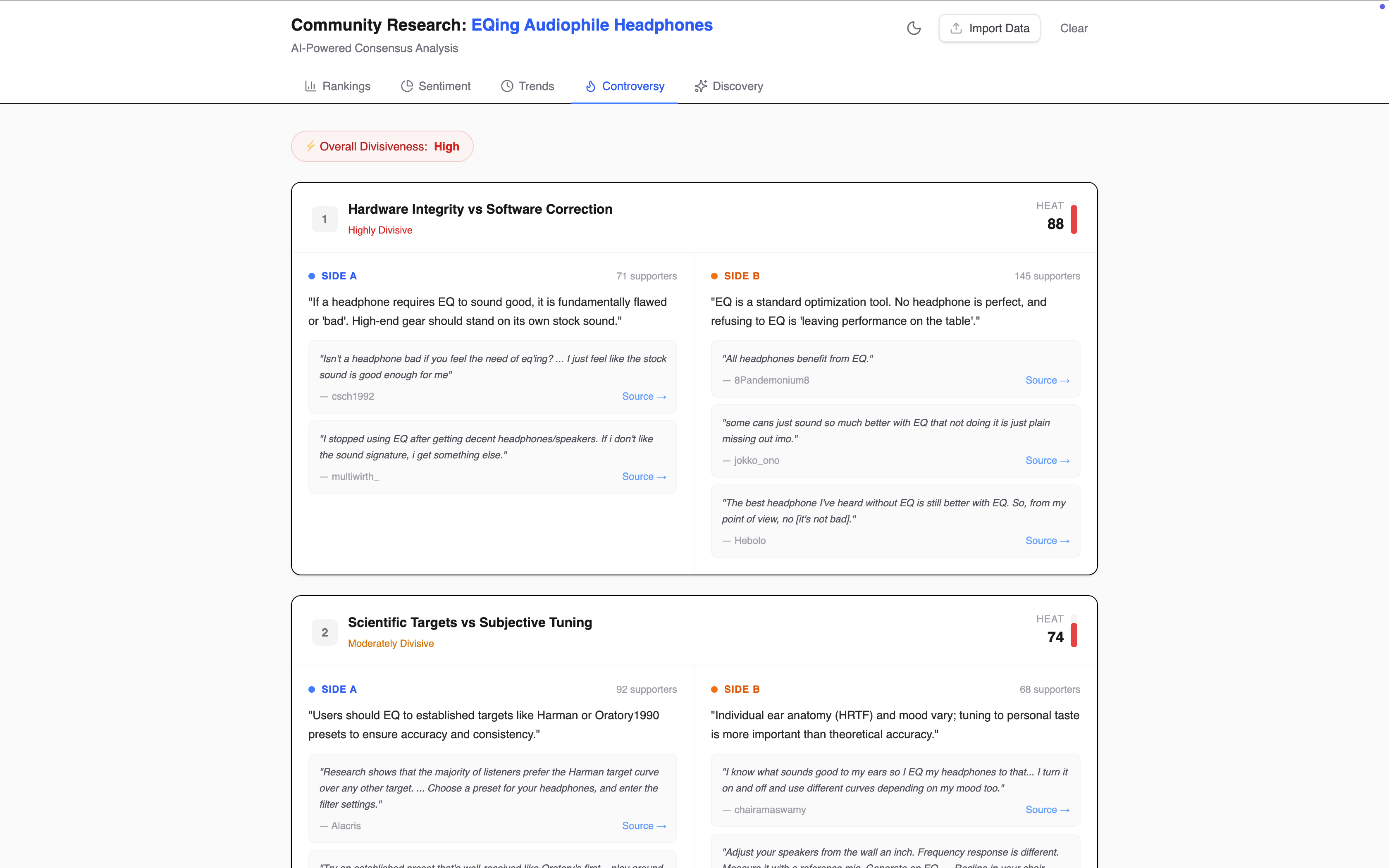 [👉 View Live Example](https://skainguyen1412.github.io/social-media-research-skill/visualize/index.html?mock=classified_controversy) --- ### 🔥 Discovery — Surface emerging topics early Spot what's gaining traction in niche communities before it goes mainstream. > _"What is trending in the world this week? Show me viral topics."_  [👉 View Live Example](https://skainguyen1412.github.io/social-media-research-skill/visualize/index.html?mock=classified_discovery) --- ## Why social-media-research-skill? - **Real data** — Pulls live discussions from Reddit and X, not cached or training data - **Real opinions** — Every insight is backed by actual quotes from real people - **Up to date** — Analyzes today's conversations, not last year's - **Structured output** — Results come as typed JSON + interactive dashboards, ready for your agent to use - **Works with your AI assistant** — Installs as a skill for Claude, Cursor, Windsurf, and more --- ## 🚀 Quick Start ### 1. Install Install the CLI globally via npm: ```bash npm install -g sc-research ``` Requires **Node.js >= 20**. ### 2. Configure API keys Create a `.sc-research` file in your project root: ```env OPENAI_API_KEY=sk-... # Required for Reddit data XAI_API_KEY=xai-... # Required for X (Twitter) data ``` You need at least one key. The tool will gracefully skip any pipeline whose key is missing. ### 3. Set up your AI assistant Run the init command to install social-media-research-skill into your AI assistant's workspace: ```bash # For Claude Code sc-research init --ai claude # For Cursor sc-research init --ai cursor # For Windsurf sc-research init --ai windsurf # For Antigravity sc-research init --ai antigravity # Or set up multiple at once sc-research init --ai claude,cursor # Or all supported platforms sc-research init --ai all ``` Supported platforms: `claude` · `cursor` · `windsurf` · `antigravity` · `all` ### 4. Start asking questions That's it — you're ready. Just ask your AI assistant questions in **natural language**, like you normally would: - _"What do people think about the Sony WH-1000XM6?"_ - _"What's trending in the gaming community this week?"_ - _"Is it worth upgrading to the new MacBook Air M4?"_ - _"What are the best budget IEMs under $50?"_ Your AI assistant will automatically use social-media-research-skill to fetch live discussions from Reddit and X, analyze them, and give you a structured answer backed by real data. ### 5. Visualize results For deeper analysis, your agent generates structured JSON files. You can view them in an interactive dashboard: ```bash sc-research visualize ``` This opens a local dashboard in your browser with charts, sentiment breakdowns, ranked lists, trend timelines, and direct quotes from real discussions. ### Using the CLI directly You can also use the CLI directly without going through your AI assistant: ```bash # Quick research sc-research research "best budget IEMs under $50" # Deep dive — pulls more data for a thorough analysis sc-research research:deep "best budget IEMs under $50" ``` --- ## 📊 Analysis Types | Type | Output | Description | |---|---|---| | **Rank** | `classified_rank.json` | Community-driven rankings with social evidence | | **Sentiment** | `classified_sentiment.json` | Public opinion breakdown by mood and source | | **Trend** | `classified_trend.json` | Momentum and popularity shifts over time | | **Controversy** | `classified_controversy.json` | Polarized debates mapped with opposing arguments | | **Discovery** | `classified_discovery.json` | Emerging topics surfaced from niche communities | --- ## 🔧 CLI Reference | Command | Description | |---|---| | `sc-research research "